
When you’re setting up a new Google Search campaign, ticking all the boxes and navigating the settings can feel overwhelming. It’s easy to stick with the defaults, especially for options like the “Include Google Search Partners” network. It sounds good, right? More reach, more potential customers?
Maybe. But maybe not.
As someone who spends their days inside Google Ads accounts, I’ve seen countless times how this simple, often overlooked checkbox can impact performance – sometimes significantly. Many advertisers leave it checked by default, assuming it’s beneficial, but often without verifying if it truly aligns with their goals. Plus Google’s UI makes it seem like it is bad to uncheck it and makes it a bit harder to see reports on the Search Partners performance.
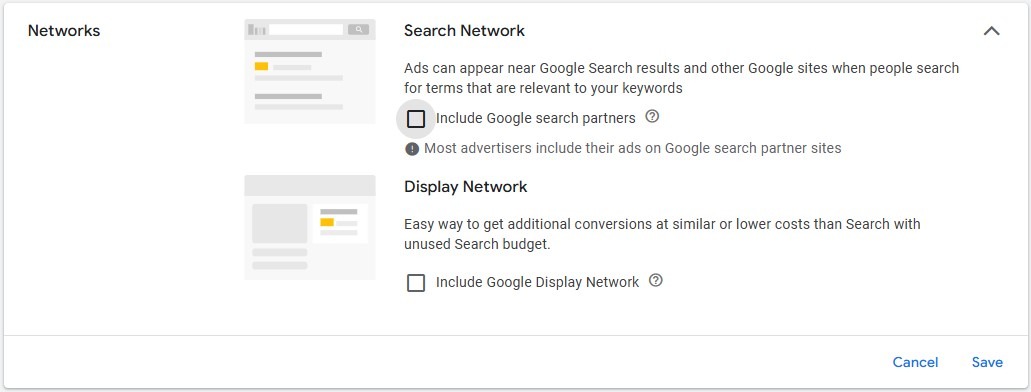
So, let’s take a calm, practical look at what Search Partners are and how you can decide if they’re right for your specific campaigns.
What Exactly Are Google Search Partners?
Think of the Google Ads universe expanding beyond just google.com. Google does not provide a complete list. This is what they say officially:
Search partners can extend the reach of Google Search ads and listings to hundreds of non-Google websites, Parked Domains, as well as YouTube and other Google sites.
On search partners sites, your ads and listings can appear on search results pages, site directory pages, parked domains, or other pages related to a person’s search.
The promise is increased reach – showing your ads to more people across more places.
The Potential Upside (Why It’s an Option)
In theory, Search Partners can:
- Expand your impression volume and potential click traffic.
- Sometimes (though not always) offer lower Cost Per Click (CPC) compared to Google Search.
- Capture users who might not search directly on google.com but have relevant intent on partner sites.
The Common Reality (Why You Need to Be Cautious)
Here’s where the honest assessment comes in, based on what I often see in the data:
- Different User Intent: Someone searching on google.com often has a clearer, stronger intent than someone seeing an ad alongside content on a partner site or a parked domain.
- Lower Performance Metrics: More often than not, traffic from Search Partners tends to have a lower Click-Through Rate (CTR) and, more importantly, a lower Conversion Rate compared to standard Google Search traffic.
- Higher Cost Per Acquisition (CPA): If conversions are happening, they might be coming at a significantly higher cost than your target CPA, eating into your budget inefficiently.
- Lack of Transparency: You have less direct control and visibility over exactly where your ads show within the partner network compared to the main search results page.
- Diluted Data: If Search Partners perform poorly, they can drag down your overall campaign metrics, making it harder to assess the true performance of your core Google Search efforts.
Don’t Guess – Check Your Own Data!
Theory and general observations are useful, but your account data holds the definitive answer. Luckily, checking this is straightforward:
- Navigate to the Campaigns section.
- Select the Search campaign(s) you want to analyze.
- Click on “Segment” (usually found above the main data table).
- From the dropdown menu, choose “Network (with Search Partners)”.
Now, your campaign data (or ad group data, if you drill down) will be split into rows showing performance for:
- Google search
- Search partners
- Google Display Network
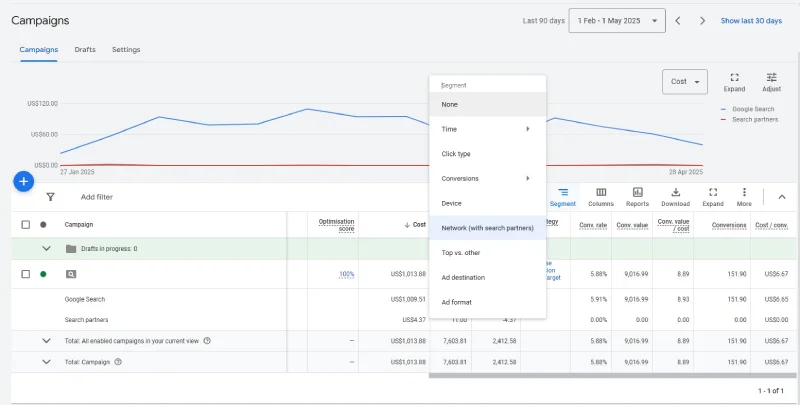
What to Look For:
Compare the key performance indicators (KPIs) between “Google search” and “Search partners”:
- Cost: How much are you spending on each network?
- Conversions: Are Search Partners driving any valuable conversions?
- Cost Per Acquisition (CPA) / Cost per Conversion: Is the cost acceptable for conversions from Search Partners compared to Google Search and your overall targets?
- Conversion Rate: How effectively does traffic from each network convert?
- Clicks & CTR: Are you getting engagement, even if conversions aren’t there? (High clicks + cost but no conversions is a red flag).
One important thing that I have noticed and I think is good to keep in mind is that if the conversions you have set up in your account are easy – contact page visits, form submissions and clicks on phone numbers for example, Search partners tend to show decent performance likely due to bot traffic, but if they are hard – online orders for example, they are usually bad.
I got the idea to write about this after reading this post from Mike Ryan.
I had never seen this large of a percentage of the budget being spent by Search Partners before. Another valuable insight I learned from him is that Search Partners use only CPA bidding. It does not work together with Maximize Conversion Value or Target ROAS bidding even if your campaign is setup to use them.
Making the Decision: Keep or Remove?
Based on your data:
- Performing Well? If Search Partners are driving conversions at an acceptable CPA (similar to or better than Google Search) and contributing meaningful volume, feel free to keep it enabled. But keep monitoring it periodically!
- Performing Poorly? If Search Partners are spending a significant portion of your budget with few/no conversions, or a CPA way above your target, it’s likely time to untick that box. Go into your campaign settings > Networks > and uncheck “Include Google Search Partners”.
- Minimal Traffic/Spend? If the volume and spend are negligible, turning it off probably won’t hurt and can simplify your campaign management slightly.
- Edge Case: Brand Campaigns: Sometimes, brand campaigns (where people search specifically for your company name) might perform okay on Search Partners. Check the data even here.
Conclusion: Trust, But Verify Your Defaults
The Google Search Partners network isn’t inherently bad, but it’s certainly not always good for every advertiser or campaign. I personally would opt out of it. The key takeaway is simple: don’t rely on default settings.
Take those few minutes to segment your network performance. Understand where your budget is going and what results it’s driving. Making this small check can lead to more efficient spending, better campaign performance, and ultimately, better results for your business. It’s about making informed decisions based on data, not assumptions.